FAQs
Placeholder
1) What is Plug P2P?
Plug P2P is a mobile app for peer-to-peer EV charging. It enables Hosts to rent out their charger or electrical outlet to drivers who want to charge. Users that request a charging reservation on the Plug P2P app are Guests.
2) I don’t own an EV, can I still be a Host?
Yes! You can sign up to be a Host even if you don’t own an electric vehicle. Owners of any qualified charger or electrical outlet can sign up to be a Host.
3) Is it free to sign up?
Yes! It is free to download the Plug P2P app and become a Host, a Guest, or both. There is no membership fee.
4) How much does electricity cost?
The average cost of electricity in the US is approximately $0.18 per kilowatt-hour (kWh) used. Here are a few examples of the average cost of electricity for charging at max power output with different devices at $0.18 per kW, for one hour: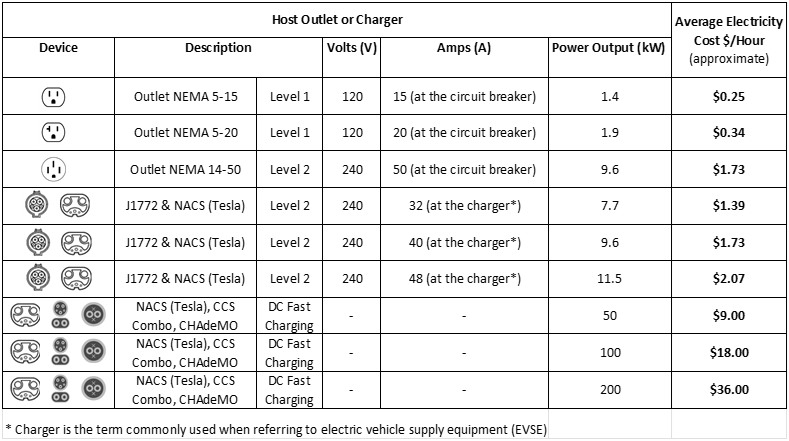
Electricity rates vary depending on location, time of day, property type, and other factors and range from about $0.10 to $0.33 or more per kilowatt-hour (kWh) used. Some states like Hawaii, California, and states in the northeast may have higher electricity rates than the average. Check your electric utility bill for your specific electricity rates. Your electricity provider can clarify any questions you may have regarding your specific electricity rates.
5) How much should I charge to rent out my charger or outlet?
Hosts can set their hourly rental price at whatever seems reasonable to them. The amount that a Host can rent their charger for may be impacted by their location, the type of charger or outlet they are offering, their availability, nearby attractions and amenities, and other factors.
6) Can Guests charge at my property at any time?
Hosts set their availability (dates and times) in the app. Guests can only request a reservation to charge at a Host’s property during the available dates and times set by the Host. Hosts can accept or decline reservation requests. Guests are only permitted to charge at the Hosts location during the accepted reservation date and time.
7) Is the Host's address displayed to all users within the app?
No, the Host’s address is not visible to all users within the app. The Host’s address will only be shared with a specific Guest after the Host has accepted the Guest’s reservation request and the Guest’s payment has been processed, within 24 hours of the reservation start time.
8) What if my charger is inside my garage?
If the charger cable is long enough, some Hosts simply extend their cable under the garage door and then close the garage door.
9) Is the Host required to be home during charging reservations?
The Host can decide if they will be home during charging reservations or not. Hosts can check the box to select “Contactless Charging” if they do not intend to interact with Guests. Hosts should be sure to provide access and instructions, so that Guests with accepted reservation requests can find and use the charger or electrical outlet.
10) What is needed to set up a Host account?
For an electrical outlet: a Host will need to know the volts and amps (at the circuit breaker) for the electrical outlet they are listing or the max acceptable power (kW) output for continuous load at that outlet. For example, a typical residential electrical outlet (NEMA 5-15) generally operates at approximately 120 V, 15 A (at the circuit breaker), and 1.4 kW.
For an EV charger (EVSE): Hosts will need to know the volts and amps output setting at the charger (EVSE), or the power (kW) output setting at the charger (EVSE).
Hosts will also be prompted to:
- confirm that their charger or outlet was installed by a licensed electrician.
- upload a photo of their charger, and up to three photos showing users where to find the charger or electrical outlet on your property.
- provide a brief description and photo for their account profile.
- sign-up with Stripe Inc. to receive payments. Stripe will verify your identity and bank information in order to meet government regulations and deposit payments into your bank account. If you have used Stripe in the past, you will easily be able to connect your account via Link to start receiving payments.
11) How will I be paid?
Payment is transferred directly into your bank account, generally within 72 hours after the charging reservation is completed. Please see our Terms & Conditions for complete details.
12) How do I sign up?
Simply download the free Plug P2P app from either the App Store or Google Play store and decide if you want to be a Host or a Guest to start. Then follow the prompts to input your information. It takes about 10 minutes and it’s free to get the Plug P2P app and set up an account.
13) What is needed to set up a Guest account?
To set up a Guest account, you will be prompted to provide:
- your vehicle identification number (VIN), which can be found inside the driver’s side door of your vehicle (you can just scan the bar code with your phone while in the app). In some vehicles, you may also find the VIN on your driver’s side dash panel near the windshield, or you can find the VIN on your vehicle registration or insurance documents (if you would rather enter it manually).
- a photo of your vehicle, from a front three-quarter angle view.
- your vehicle license plate number and color.
- a brief description and a photo for your account profile.
- your credit card number for payment. Payment is only processed when you request a reservation, and the Host accepts your reservation request.
14) If I sign up as a Guest, do I also need to sign up as a Host?
You can sign up to be either a Guest, a Host, or both depending on your interests and needs. It’s free and easy to get the Plug P2P app and set up an account.
15) What about security and privacy?
Security and privacy are a priority:
- all property rights and laws apply when you are using the Plug P2P app.
- Plug P2P enables contactless payments, contactless reservations, Guest vehicle identification (VIN, make, model, color, license plate), and ratings and reviews for both Hosts and Guests.
- a Host’s address is not displayed until a reservation request is accepted by the Host, Guest payment has been processed, and the reservation is within 24 hours of start time.
- we do not sell user data, and all data and app usage are governed in accordance with our Terms & Conditions and Privacy Policy.
16) What is a qualified EV Charger (EVSE) or electrical outlet?
A qualified device is an electrical outlet or electric vehicle supply equipment (EVSE), commonly called an EV charger, that meets all national and local electrical safety standards and electrical code for both the device and installation. Qualified electrical outlets must be on a dedicated circuit with no other electrical devices connected or drawing power from that circuit and must be properly grounded for safety when used for EV charging. All EV Chargers (EVSE) and electrical outlets used for EV charging must be installed or verified by a qualified licensed electrician and must meet all national and local electrical safety standards and ordinances, including but not limited to NEC (NFPA 70) standards. Always follow electrical device and vehicle manufacturer instructions.
17) Are Hosts permitted to have cameras and other recording devices on their property?
Hosts are permitted and encouraged to have cameras and other recording devices on their property, except in restrooms available to Guests. Cameras and other recording devices in restrooms available to Guests are prohibited.
18) Can I list a different electrical outlet than what is presently shown in the app?
For user safety and convenience, only certain types of charging devices with permitted electrical characteristics are accepted at this time.
19) Do you collect any taxes or fees?
In some instances, we may collect estimated state or local taxes from Guests, for payment to state or local taxing authorities on behalf of Hosts. Where we collect estimated taxes, we will notify Hosts of the taxes collected on their behalf via transaction summaries, which may be issued periodically; see our Terms & Conditions for complete details. We also collect service fees, which are used to pay for third party payment processing, cloud and network storage, hosting and maintenance fees, developer fees, and other business and operating costs.
20) I have another question; how can I reach you?
Email us at contact@plugp2p.com. We read all emails and will do our best to answer any questions as soon as possible.